Locate and click on the Switch Access link in the top left-hand part of the screen.
Use the menu option to select the appropriate items from the three drop-down menus.
Examples in this document may differ from your system.
Reporting Term
This is the date range for current or past programs.
Security Role
The role chosen here determines the user’s access level to the system for the selected Organization. A permissions system controls which security roles can access which data (and if the data is editable or read-only) and which system functions each role can access. For example, a lower-level user does not have permission to access the system's setup functionality.
Most users will only have one security role as an option in this drop-down, but some may have more than one if they provide support to other users. By switching to the security role of the user they are supporting, they can view the screens as they appear to the user being supported; this can be helpful in understanding the area where they have questions.
Organization
This is an entity that provides services to individuals, such as a School District, Community-Based Organization, or Site.
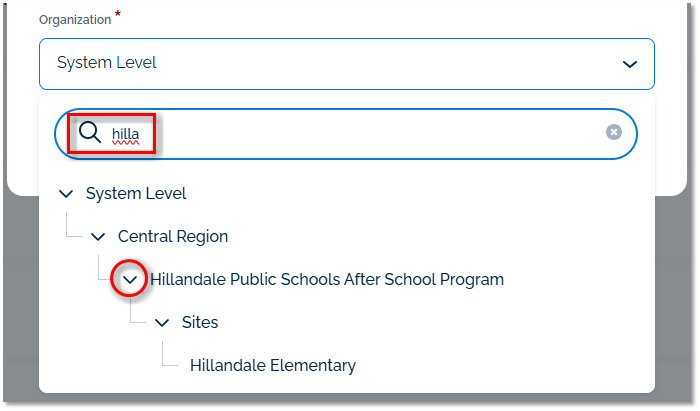
You can use the search bar to locate a specific organization by typing all or part of the Organization's name.
You can also "drill down" the Organization list by clicking on the drop-down arrows to the left of each Organization name; this will expand the list to display organizations "below" the Organization you selected. For example, if you choose "Sites," you will see all the organizations that are part of the "Sites" grouping.
If an organization is inactive in the selected Reporting Term, it may not be visible in the Organization drop-down menu.
Once you’ve selected the desired options, click Switch Access
After your screen refreshes briefly, you will then have access to the system with the selected Reporting Term, Organization, and Security Role.
Updated